Author: admin

  • What is a 1099 Document? What is a 1099 Document?

    What is a 1099 Document?

    What is a 1099 Document?

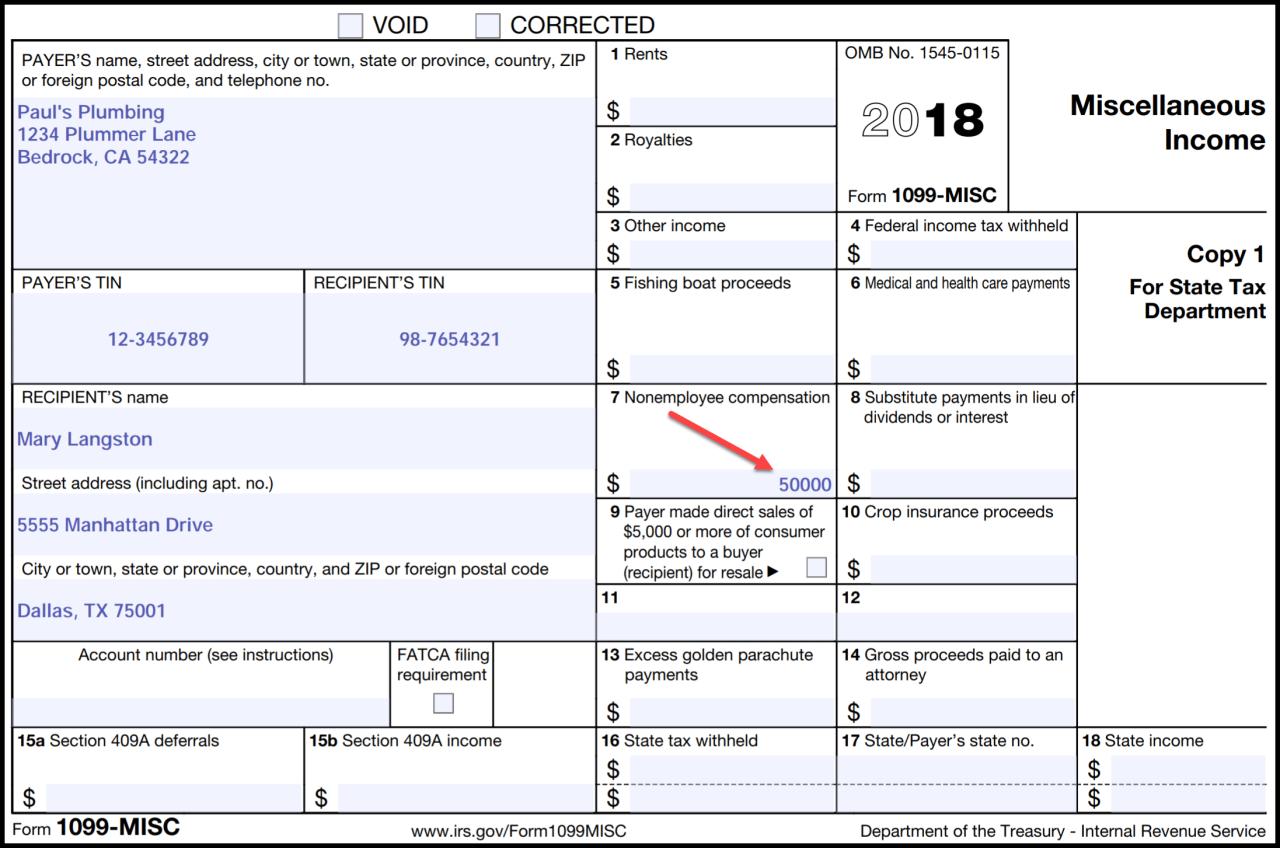
    A 1099 document is a tax form used to report income that is not subject to withholding. This includes income from self-employment, dividends, and interest. The form is used to report the amount of income received, as well as any taxes that have been withheld.

    Who Needs to File a 1099 Form?

    Any person or business that makes payments to another person or business that total $600 or more in a calendar year must file a 1099 form. This includes payments for:

    • Self-employment income
    • Dividends
    • Interest
    • Rents
    • Royalties
    • Prizes and awards
    • Nonemployee compensation

    What are the Different Types of 1099 Forms?

    There are several different types of 1099 forms, each of which is used to report a different type of income. The most common types of 1099 forms include:

    • Form 1099-NEC: This form is used to report nonemployee compensation. This includes payments made to independent contractors, freelancers, and other individuals who are not considered employees.
    • Form 1099-INT: This form is used to report interest income. This includes interest earned on savings accounts, certificates of deposit, and bonds.
    • Form 1099-DIV: This form is used to report dividend income. This includes dividends paid on stocks and mutual funds.
    • Form 1099-R: This form is used to report retirement income. This includes distributions from IRAs, 401(k) plans, and pensions.
    • Form 1099-G: This form is used to report government payments. This includes unemployment benefits, Social Security benefits, and tax refunds.

    How to File a 1099 Form

    1099 forms can be filed electronically or by mail. The deadline for filing 1099 forms is January 31st of the year following the year in which the income was received.

    Penalties for Failing to File a 1099 Form

    Failure to file a 1099 form can result in penalties. The penalty for failing to file a 1099 form on time is $250 per form. The penalty for failing to file a 1099 form at all is $500 per form.

    Conclusion

    1099 forms are used to report income that is not subject to withholding. These forms must be filed by any person or business that makes payments to another person or business that total $600 or more in a calendar year. There are several different types of 1099 forms, each of which is used to report a different type of income. The deadline for filing 1099 forms is January 31st of the year following the year in which the income was received. Failure to file a 1099 form can result in penalties.

  • Understanding Form I-9: Employment Eligibility Verification

    document for i9

    Understanding Form I-9: Employment Eligibility Verification

    Introduction

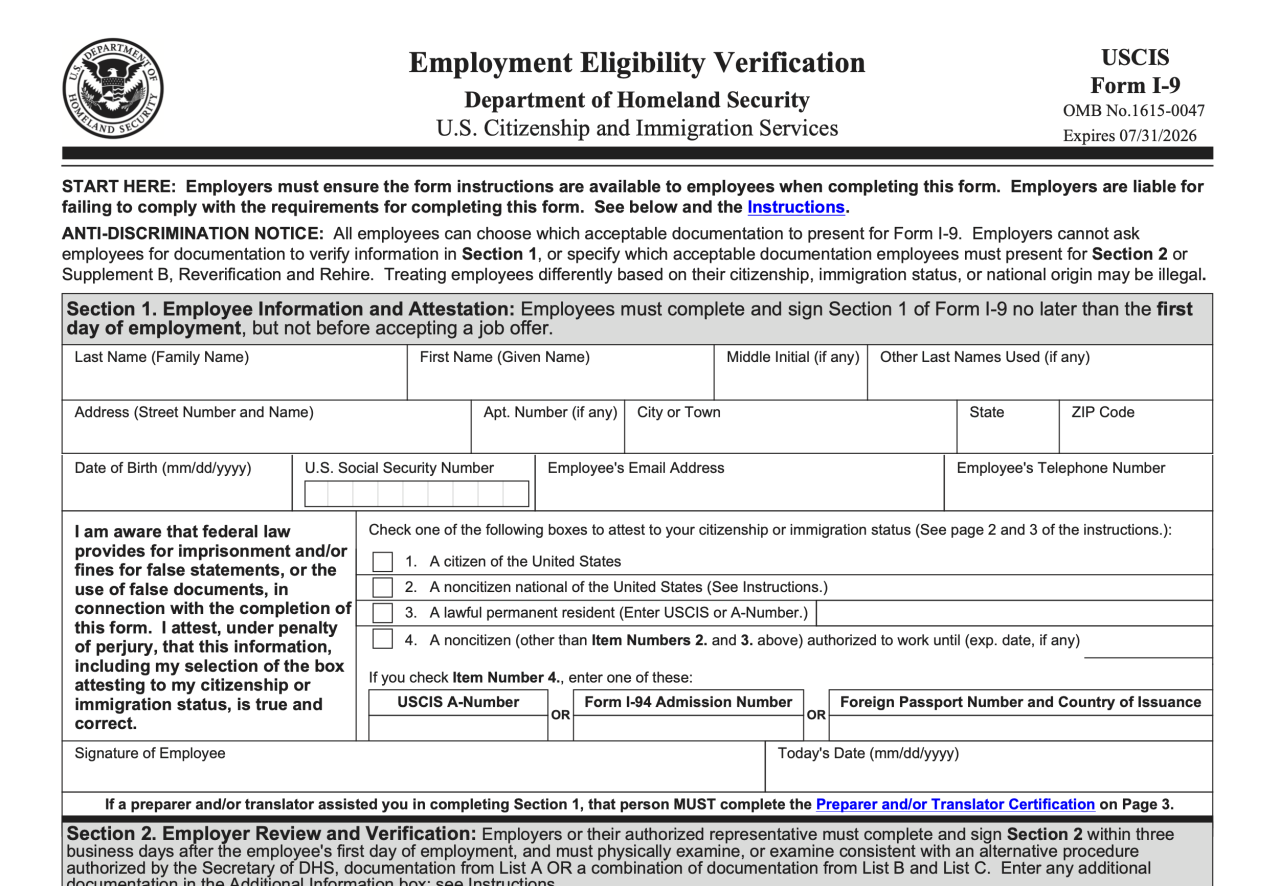
    Form I-9, Employment Eligibility Verification, is a crucial document that employers in the United States utilize to confirm the employment eligibility of their newly hired workers. This comprehensive guide delves into the intricacies of Form I-9, encompassing its significance, completion guidelines, retention requirements, and the penalties associated with noncompliance.

    Significance of Form I-9

    Form I-9 serves multiple vital purposes:

    1. Verification of Employment Eligibility: It enables employers to ascertain that their employees are authorized to work in the United States.

    2. Prevention of Discrimination: By requiring employers to verify employment eligibility uniformly for all hires, Form I-9 helps prevent discrimination in employment based on national origin or citizenship status.

    3. Compliance with Federal Law: Completing and retaining Form I-9 is a legal requirement for all employers in the United States, as mandated by the Immigration Reform and Control Act of 1986 (IRCA).

    Completing Form I-9

    The process of completing Form I-9 involves two distinct sections:

    Section 1:

    1. Employee’s Information: In this section, employees furnish personal details such as their name, address, date of birth, and Social Security number (if applicable).

    2. Employment Authorization: Employees must provide documentation establishing their authorization to work in the United States. Acceptable documents fall into three categories:

      • List A: Documents that establish both identity and employment authorization, such as a U.S. passport or a Permanent Resident Card.

      • List B: Documents that establish identity, such as a driver’s license or a state-issued ID card, along with documents that establish employment authorization, such as a Social Security card or an Employment Authorization Document (EAD).

      • List C: Documents that establish both identity and employment authorization, but are only acceptable for non-U.S. citizens, such as a foreign passport with an appropriate visa or a Transportation Worker Identification Credential (TWIC).

    Section 2:

    1. Employer’s Responsibilities: Employers must examine the employee’s original documents, record the document information, and sign and date the form.

    2. Employee’s Attestation: Employees must attest under penalty of perjury that they are authorized to work in the United States and that the documents they have presented are genuine and belong to them.

    Retention Requirements

    Employers are required to retain completed Form I-9s for a specific period:

    1. Three Years After the Date of Hire: For employees who are still employed by the company.

    2. One Year After the Date of Termination: For employees who have left the company.

    Penalties for Noncompliance

    Failure to comply with Form I-9 requirements can lead to substantial penalties:

    1. Fines: Employers may be subject to fines ranging from $216 to $2,156 per unauthorized employee.

    2. Back Taxes: Employers may be liable for back taxes, including Social Security and Medicare taxes, for unauthorized employees.

    3. Criminal Charges: In severe cases, employers may face criminal prosecution, including imprisonment, for knowingly hiring unauthorized workers.

    Conclusion

    Form I-9 plays a pivotal role in ensuring a lawful and discrimination-free workforce in the United States. Employers must adhere to the guidelines and requirements outlined in this document to verify the employment eligibility of their employees and avoid potential legal consequences. Regular updates and guidance from the U.S. Citizenship and Immigration Services (USCIS) should be monitored to stay informed of any changes or modifications to Form I-9 regulations.

  • Scanning Documents with iPhone: A Comprehensive Guide

    scanning document iphone

    Scanning Documents with iPhone: A Comprehensive Guide

    Scanning documents with an iPhone has become a convenient and efficient way to digitize physical documents and make them easily accessible on your mobile device. With the advancements in mobile technology, iPhones now come equipped with powerful cameras and built-in scanning features that allow users to quickly capture and convert paper documents into digital copies.

    Benefits of Scanning Documents with iPhone

    There are numerous benefits to scanning documents with an iPhone, including:

    1. Portability: iPhones are highly portable devices that can be easily carried wherever you go. This makes it convenient to scan documents on the move, whether you’re at home, in the office, or traveling.

    2. Convenience: Scanning documents with an iPhone is a quick and easy process. With just a few taps, you can capture a high-quality image of a document and convert it into a digital format.

    3. Accessibility: Once scanned, documents are easily accessible on your iPhone and can be shared with others via email, messaging apps, or cloud storage.

    4. Organization: Scanning documents allows you to organize and store them digitally, making it easier to find and retrieve them when needed.

    5. Security: Digital documents are more secure than physical documents, as they can be password-protected and stored in encrypted formats.

    How to Scan Documents with iPhone

    Scanning documents with an iPhone is a straightforward process that can be completed in a few simple steps:

    1. Open the Notes App: On your iPhone, open the Notes app, which is a pre-installed app on all iPhones.

    2. Create a New Note: Tap the "New Note" button to create a new note.

    3. Access the Document Scanner: Tap the "+" icon in the toolbar and select "Scan Documents."

    4. Position the Document: Place the document you want to scan within the frame displayed on your iPhone’s screen. Make sure the entire document is visible and well-lit.

    5. Capture the Image: Tap the shutter button to capture an image of the document. You can also adjust the scan area by dragging the corners of the frame.

    6. Enhance the Scan: After capturing the image, you can enhance the scan by adjusting the contrast, brightness, and color. You can also crop the image to remove unnecessary parts.

    7. Save the Scan: Once you are satisfied with the scan, tap the "Save" button to save the scanned document as an image or PDF file.

    8. Share or Export: After saving the scanned document, you can share it with others via email, messaging apps, or cloud storage. You can also export the document to other apps on your iPhone.

    Tips for Better Scanning Results

    Here are a few tips for achieving better scanning results with your iPhone:

    1. Use Good Lighting: Ensure that the document is well-lit to avoid shadows and poor image quality.

    2. Place the Document Flat: Make sure the document is placed flat on a stable surface to prevent blurry images.

    3. Avoid Clutter: Remove any unnecessary objects or clutter from the background to ensure the document is the sole focus of the scan.

    4. Steady Your Hand: Hold your iPhone steady while capturing the image to prevent blurry scans. Use a tripod or a steady surface if necessary.

    5. Clean the Camera Lens: Keep the camera lens of your iPhone clean to ensure clear and sharp scans.

    Recommended Apps for Scanning Documents with iPhone

    In addition to the built-in scanning feature in the Notes app, there are several other highly rated apps available in the App Store that offer enhanced scanning capabilities:

    1. Adobe Scan: This popular app offers advanced features like OCR (optical character recognition) for converting scanned text into editable text, multi-page scanning, and cloud integration.

    2. CamScanner: CamScanner is another popular choice that provides features like automatic border detection, document enhancement, and the ability to sign and share scanned documents.

    3. Evernote Scannable: This app is known for its simplicity and ease of use. It offers quick scanning, OCR, and the ability to organize your scanned documents into notebooks.

    4. Microsoft Office Lens: This app from Microsoft is designed for business professionals and students. It offers features like whiteboard scanning, business card scanning, and integration with Microsoft Office apps.

    5. Genius Scan: Genius Scan is a feature-rich app that offers advanced scanning modes, OCR, cloud integration, and the ability to export scanned documents in various formats.

    Conclusion

    Scanning documents with an iPhone is a convenient and efficient way to digitize physical documents and make them easily accessible on your mobile device. With the built-in scanning feature in the Notes app and various third-party apps available in the App Store, users have a variety of options to choose from. By following the tips and recommendations mentioned in this guide, you can achieve high-quality scans and effectively manage your digital documents using your iPhone.

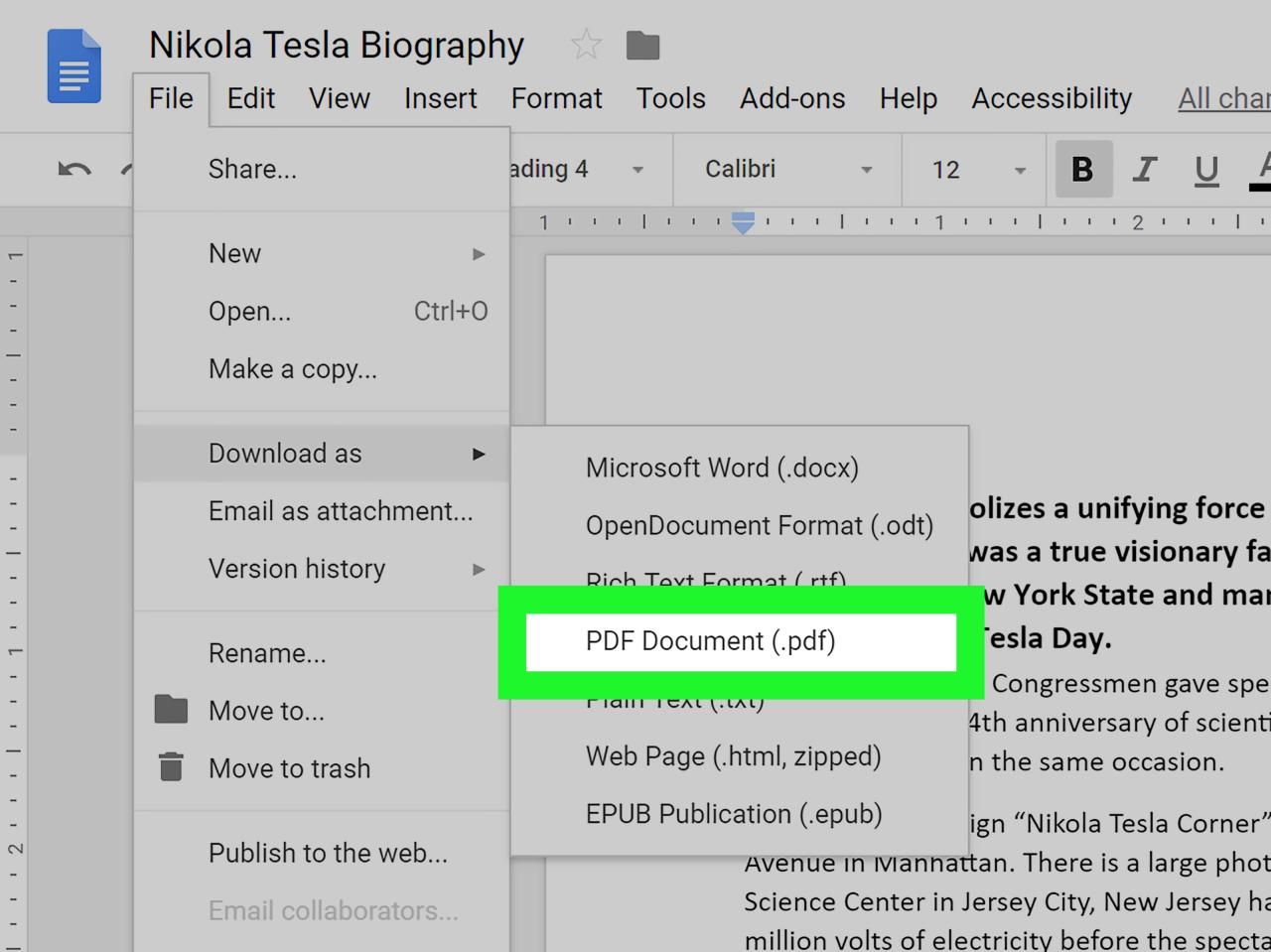
  • How Do I Convert a PDF Document to Word

    how do i convert a pdf document to word

    Understanding the Need for PDF to Word Conversion

    In today’s digital world, Portable Document Format (PDF) has become the de facto standard for sharing and storing documents. Its ability to preserve the original formatting, graphics, and layout makes it an ideal choice for official documents, contracts, and presentations. However, the need to edit or repurpose these PDF files often arises, and that’s where the conversion to Microsoft Word format comes into play.

    Methods for Converting PDF to Word

    There are several methods available to convert PDF documents to Word, each with its own advantages and drawbacks. Let’s explore the most common ones:

    Using Online PDF to Word Converters

    Online PDF to Word converters offer a quick and convenient way to convert documents without the need for additional software installation. These web-based tools typically have a user-friendly interface, allowing users to upload their PDF files and download the converted Word document in a matter of minutes. Some popular online PDF to Word converters include:

    • Adobe Acrobat Online: This tool is offered by Adobe, the creator of the PDF format, and provides accurate conversions while preserving the original formatting and layout.
    • Smallpdf: Known for its simplicity and speed, Smallpdf allows users to convert PDF to Word with a few clicks.
    • Zamzar: Zamzar is a versatile online converter that supports various file formats, including PDF to Word conversion.

    Utilizing Desktop PDF to Word Converters

    Desktop PDF to Word converters are software programs installed on your computer, providing more advanced features and customization options compared to online converters. These programs typically offer batch conversion, allowing users to convert multiple PDF files simultaneously, and provide more control over the conversion process. Some notable desktop PDF to Word converters include:

    • Adobe Acrobat Pro: As the paid version of Adobe Acrobat, Acrobat Pro offers a comprehensive suite of PDF editing and conversion tools, including accurate PDF to Word conversions.
    • Nuance Power PDF: Power PDF is a feature-rich alternative to Adobe Acrobat, known for its OCR (Optical Character Recognition) capabilities, enabling users to convert scanned PDF documents to editable Word files.
    • Nitro Pro: Nitro Pro is another robust PDF editor and converter that provides fast and reliable PDF to Word conversions while preserving the original formatting.

    Employing Microsoft Word’s Built-In Conversion Feature

    Microsoft Word has a built-in feature that allows users to open and convert PDF files directly within the application. This method is straightforward and convenient, especially for those who already have Microsoft Word installed on their computers. To use this feature:

    1. Open Microsoft Word.
    2. Click the “File” tab in the top-left corner.
    3. Select “Open” from the left pane.
    4. In the “File Open” dialog box, navigate to the PDF file you want to convert.
    5. Click the “Open” button.
    6. A message will appear, asking you to confirm the conversion. Click “OK.”

    Choosing the Right Conversion Method

    The best method for converting PDF to Word depends on your specific needs and preferences. Consider the following factors when making your choice:

    Accuracy and Formatting Preservation

    If accuracy and preserving the original formatting are of utmost importance, opting for a paid desktop converter like Adobe Acrobat Pro or Nuance Power PDF is recommended. These programs typically employ advanced conversion algorithms that ensure faithful reproduction of the original document.

    Batch Conversion

    If you need to convert multiple PDF files simultaneously, a desktop PDF to Word converter or an online converter that supports batch conversion is the way to go. Batch conversion can save you time and effort, especially when dealing with large volumes of documents.

    Accessibility and Convenience

    For quick and easy conversions without the need for software installation, online PDF to Word converters are a great option. They are accessible from any device with an internet connection, making them ideal for users on the go or those who prefer not to install additional software on their computers.

    Additional Tips for Successful PDF to Word Conversion

    To ensure a successful PDF to Word conversion, follow these tips:

    Use High-Quality PDF Files

    The quality of the input PDF file plays a significant role in the conversion outcome. Ensure that the original PDF file is clear, legible, and free of errors. Poor-quality PDF files may result in conversion issues or inaccuracies.

    Edit Converted Word Documents

    Once the PDF file is converted to Word, it’s a good practice to review and edit the document to ensure accuracy. The conversion process, while generally reliable, may introduce minor formatting or content errors that need to be corrected.

    Leverage OCR for Scanned PDFs

    If you’re working with scanned PDF documents, consider using an OCR-enabled PDF to Word converter. OCR technology allows the program to recognize and convert text from scanned images, making them editable in Word.

    Conclusion

    Converting PDF documents to Word is a common task in the digital age, and there are various methods available to accomplish this. By understanding the different conversion methods, their advantages, and limitations, you can choose the best approach that suits your specific needs. Whether you prefer the convenience of online converters, the advanced features of desktop programs, or the simplicity of Microsoft Word’s built-in conversion feature, there’s a solution that will help you convert your PDF documents to Word efficiently and effectively.

  • The Intricacies of Form K-1 Tax Document

    k1 tax document

    Understanding the Purpose and Significance of Form K-1

    Form K-1 is an intricate tax document issued annually by partnerships, S corporations, limited liability companies (LLCs), and other pass-through entities to their individual partners or shareholders. It serves as a crucial tool for reporting each partner’s or shareholder’s share of income, deductions, credits, and other tax-related information. Understanding this document is essential for accurately preparing and filing individual tax returns.

    Who Receives Form K-1?

    • Partnerships: Each partner receives a Schedule K-1 from the partnership.
    • S Corporations: Shareholders of an S corporation receive a Schedule K-1.
    • Limited Liability Companies (LLCs): If an LLC elects to be taxed as a partnership, its members receive Schedule K-1s.
    • Trusts and Estates: Beneficiaries of trusts and estates may receive Schedule K-1s.

    Deciphering the Sections of Form K-1

    Form K-1 consists of multiple sections, each containing specific information. Here’s a breakdown of the key sections:

    Section I: Partner’s Share of Income, Deductions, Credits, etc.

    • Line 1: Ordinary Income: Reports the partner’s share of ordinary income or loss.
    • Line 2: Net Income or Loss: Reflects the partner’s net income or loss from the partnership.
    • Line 3: Capital Gain or Loss: Shows the partner’s share of capital gains or losses.
    • Line 4: Other Income or Loss: Includes other income or loss items not specified elsewhere.

    Section II: Partner’s Distributive Share of Credits

    • Line 5: Qualified Dividends: Reports the partner’s share of qualified dividends received by the partnership.
    • Line 6: Foreign Tax Credit: Reflects the partner’s share of foreign tax credits passed through from the partnership.
    • Line 7: Other Credits: Includes other credits passed through to the partners.

    Section III: Partner’s Distributive Share of Nondeductible, Pass-Through Expenditures

    • Line 8: Nondeductible Expenses: Reports the partner’s share of nondeductible expenses incurred by the partnership.
    • Line 9: Depletion of Oil and Gas Wells: Shows the partner’s share of depletion deductions related to oil and gas wells.

    Section IV: Capital Account Activity

    • Line 10: Beginning Capital Account: Reflects the partner’s capital account balance at the beginning of the tax year.
    • Line 11: Capital Contributions: Shows any capital contributions made by the partner during the tax year.
    • Line 12: Distributions: Includes any distributions received by the partner from the partnership.
    • Line 13: Ending Capital Account: Reports the partner’s capital account balance at the end of the tax year.

    Reporting Form K-1 Information on Your Tax Return

    Partners or shareholders must include information from their Form K-1 on their individual tax returns. Here’s how:

    Partnerships

    • Schedule E (Form 1040): Partners report their share of partnership income and expenses on Schedule E.
    • Form 8955: Partners must file Form 8955 to report their share of passive income and losses.

    S Corporations

    • Schedule E (Form 1040): Shareholders report their share of S corporation income and expenses on Schedule E.
    • Form 8995: Shareholders must file Form 8995 to report their share of passive income and losses.

    LLCs

    • Schedule C (Form 1040): Members of an LLC taxed as a partnership report their share of LLC income and expenses on Schedule C.
    • Form 8955: Members must file Form 8955 to report their share of passive income and losses.

    Deadlines for Filing Form K-1 and Related Tax Returns for 2023

    Form K-1 Deadline

    The due date for partnerships and S corporations to furnish Schedule K-1 to their partners or shareholders is:

    • March 15, 2023 for calendar year partnerships and S corporations.

    Tax Return Deadlines

    • April 18, 2023: Due date for filing individual tax returns for calendar year taxpayers.
    • October 16, 2023: Extended due date for individual tax returns with an extension filed by April 18, 2023.

    Seeking Professional Assistance

    Taxpayers facing complexities related to Form K-1 or their tax returns should consult with a qualified tax professional, such as a certified public accountant (CPA) or enrolled agent (EA). These professionals can provide expert guidance, ensure accurate reporting, and help taxpayers avoid potential penalties.

    Staying Informed: Latest Updates and Resources

    • IRS Website: The Internal Revenue Service (IRS) website offers comprehensive information, instructions, and forms related to Form K-1 and pass-through entities.
    • Tax Publications: The IRS publishes helpful tax publications, including Publication 569: Miscellaneous Deductions, which provides detailed guidance on reporting pass-through entity income and expenses.

    Conclusion

    Form K-1 plays a crucial role in reporting income, deductions, credits, and other tax-related information from pass-through entities to their partners or shareholders. Thoroughly understanding this document and accurately reporting the information on individual tax returns is essential for complying with tax laws and avoiding potential issues. Individuals seeking assistance should consult with a qualified tax professional for expert guidance and support.

  • The Standard Form of Identification for DoD Employees

    The Department of Defense (DoD) is one of the largest and most complex organizations in the world, employing millions of people in various capacities. To maintain the security and integrity of its operations, the DoD has established rigorous standards for employee identification.

    Photo: stories on freepik.com

    In this article, we will explore the standard form of identification for DoD employees and delve into the various components and security measures in place. We will draw information from sources such as Brainly and Quizlet, while also incorporating additional insights to provide a comprehensive understanding of this critical aspect of DoD security.

    1. The Need for Secure Identification

    The DoD’s need for secure identification is paramount. It operates a vast network of facilities, from military bases to research institutions, and its employees work on a wide range of classified and sensitive projects. Ensuring that only authorized personnel have access to specific areas, information, and resources is a fundamental security concern.

    2. Common Components of DoD Employee Identification

    According to the sources provided, there are several components commonly found in the standard form of identification for DoD employees:

    1. Photograph

    A photograph of the employee is typically a prominent feature of the identification card. This helps security personnel quickly verify the identity of the cardholder and determine whether they match the image on the card.

    2. Employee Name and Affiliation

    The employee’s full name and affiliation with the DoD are usually printed on the card. This information clarifies the individual’s role and responsibilities within the organization.

    3. Personal Identifiers

    Personal identifiers, such as the employee’s ID number or a unique serial number, serve as a primary means of tracking and verifying an individual’s identity. They are essential for record-keeping and security checks.

    4. Barcode or Magnetic Stripe

    To facilitate electronic access control and record-keeping, the identification card often includes a barcode or magnetic stripe. These technologies allow for quick scanning and validation of the cardholder’s status and permissions.

    5. Security Features

    Security features, such as holograms, watermarks, and other anti-counterfeiting measures, are incorporated to prevent fraudulent reproduction of the card.

    3. DoD’s Commitment to Security Awareness

    The DoD’s commitment to security awareness is evident in its requirement for annual security awareness refresher training. This training ensures that all employees remain knowledgeable about security protocols and the importance of safeguarding their identification cards. The Quizlet source you provided likely contains flashcards related to this training, helping employees stay informed and vigilant.

    4. Types of DoD Employee Identification Cards

    DoD issues various types of identification cards, each serving different purposes and granting different levels of access. These cards include:

    1. Common Access Card (CAC)

    The Common Access Card is the most well-known type of identification within the DoD. It serves as both an ID card and an authentication device, allowing access to computer networks, secure facilities, and encrypted communications.

    2. Military ID Card

    Military ID cards are issued to active-duty military personnel, their dependents, and retired military members. These cards grant access to military installations and entitle cardholders to certain benefits and privileges.

    3. Defense Civilian ID Card

    Defense civilian employees receive a Defense Civilian ID Card, which identifies them as DoD employees. These cards typically include features like a photograph, name, affiliation, and personal identifier.

    4. Contractor ID Card

    Contractors working with the DoD are also issued identification cards, often known as Contractor ID Cards. These cards help distinguish them from military and civilian personnel and specify their level of access and permissions.

    5. The Role of CAC in DoD Security

    The Common Access Card (CAC) is a linchpin in DoD security. It has evolved into a multifunctional smart card that serves as both an identity card and a key to access various DoD systems. Here are some key aspects of the CAC’s role in security:

    1. Authentication

    The CAC is a powerful authentication tool. It includes a microprocessor chip and requires a Personal Identification Number (PIN) to unlock. This two-factor authentication system ensures that only authorized users can access sensitive DoD systems.

    2. Digital Signatures

    The CAC supports digital signatures, allowing DoD employees to securely sign electronic documents. This is invaluable for maintaining the integrity and authenticity of electronic records.

    3. Physical Access Control

    CACs are used for physical access control to DoD facilities. Cardholders can gain entry to secure areas by scanning their cards at access points, where the information is quickly verified against a secure database.

    4. Secure Communication

    The CAC facilitates secure communication, including email encryption and digital certificates for secure network access. This is crucial for protecting classified information and sensitive communications.

    6. Security Measures to Protect DoD Identification Cards

    Ensuring the security of identification cards is of utmost importance in the DoD. The Brainly source mentions that the DoD employs various security measures to safeguard these cards, including:

    1. Personal Identification Number (PIN)

    As mentioned earlier, the CAC requires a PIN for activation. This adds an extra layer of security to prevent unauthorized use in case the card is lost or stolen.

    2. Card Activation and Deactivation

    DoD identification cards can be remotely activated and deactivated, allowing quick response to security threats or the loss of a card.

    3. Regular Renewal and Updates

    Cards typically have expiration dates, and employees are required to renew them. This process ensures that the cards remain current and that outdated cards cannot be used maliciously.

    4. Reporting Lost or Stolen Cards

    Employees are responsible for reporting lost or stolen cards promptly. This triggers immediate deactivation and replacement.

    5. Card Authentication

    Cards are authenticated electronically by scanners and security systems, ensuring that only genuine cards are accepted.

    7. The Future of DoD Identification

    The DoD is continually adapting and improving its identification and security systems to stay ahead of evolving threats. While the sources provided offer valuable insights, it’s important to recognize that security measures and identification technology are subject to ongoing updates and advancements.

    • Biometric Authentication: The DoD is increasingly exploring biometric authentication methods, such as fingerprint and iris scans, to enhance security. These methods can further reduce the risk of unauthorized access.
    • Enhanced Smart Cards: Smart card technology is advancing, and future identification cards may incorporate even more sophisticated security features, such as advanced encryption and secure elements.
    • Mobile Authentication: The proliferation of smartphones has led to the development of mobile authentication apps that can supplement or even replace physical identification cards. This technology may become more prevalent in the DoD’s security framework.

    Conclusion

    The standard form of identification for DoD employees is a critical component of the organization’s overall security strategy. Through careful design, robust security measures, and employee training, the DoD ensures that only authorized personnel have access to classified information and secure facilities. The Common Access Card, in particular, plays a pivotal role in authentication, access control, and secure communication.

    As the threat landscape evolves, the DoD is likely to continue enhancing its identification and security systems to adapt to new challenges. By staying vigilant, maintaining a commitment to security awareness, and leveraging advanced technology, the DoD aims to maintain the highest standards of security for its employees and its critical missions.

  • Identify Inventory Items Available for Purchase in Normal Business Operations

    Inventory, a fundamental aspect of business operations, plays a pivotal role in the supply chain, production processes, and overall financial health of a company. It encompasses a wide range of items held for various purposes, from raw materials and work-in-progress to finished goods. In this article, we will explore the concept of inventory, its different types, and why items held for sale in the normal course of business are a crucial element in the business world.

    Photo: freepik on freepik.com

    Defining Inventory

    Inventory refers to all the tangible assets that a business holds for various purposes within the organization. These assets can include raw materials, work-in-progress, finished goods, and even supplies necessary for day-to-day operations. In the context of this discussion, we will focus on items held for sale in the normal course of business.

    Types of Inventory

    To grasp the concept better, let’s delve into the types of inventory that exist:

    1. Raw Materials: Raw materials are the basic components that a company uses to produce its final products. For instance, a bakery would consider flour, sugar, and eggs as raw materials for making cakes and pastries.

    2. Work-in-Progress (WIP): Work-in-progress inventory comprises partially completed goods that are in various stages of production. These items are not yet finished but are on their way to becoming final products. In the automobile manufacturing industry, a car that is being assembled but is not yet complete is a good example of WIP inventory.

    3. Finished Goods: Finished goods are the end products that are ready to be sold to customers. In a retail store, these would be the items neatly displayed on shelves or in the storeroom, waiting to be purchased by consumers.

    4. MRO Inventory (Maintenance, Repair, and Operations): MRO inventory includes items necessary for the maintenance, repair, and daily operations of a business. These can range from office supplies to spare parts for machinery.

    5. Safety Stock: Safety stock is an extra quantity of inventory held by a company to mitigate the risk of stockouts. It acts as a buffer against unexpected fluctuations in demand or supply chain disruptions.

    6. Consignment Inventory: Consignment inventory is stock that is owned by a supplier but stored at the buyer’s location. The buyer only pays for these items once they are used, making it a flexible and cost-effective arrangement.

    7. Anticipatory Inventory: Anticipatory inventory is held by businesses in anticipation of events that may lead to increased demand, such as seasonal trends or promotions. For example, retailers may stock up on holiday decorations before the holiday season.

    8. Cycle Inventory: Cycle inventory is the amount of inventory a business orders in regular intervals to meet its anticipated demand. It helps to optimize order quantities and maintain a continuous flow of goods.

    Why Inventory Matters

    Inventory management is crucial for businesses for several reasons:

    • Having the right amount of inventory ensures that customers can purchase products when they want. It prevents stockouts and keeps customers satisfied.
    • Efficient inventory management streamlines production and distribution processes, reducing costs and waste.
    • Managing inventory effectively can free up working capital for other business needs. Holding excess inventory ties up funds that could be used for other investments.
    • A well-managed inventory can help businesses withstand supply chain disruptions, such as natural disasters or unforeseen events like the COVID-19 pandemic.
    • Balancing the costs associated with holding inventory, such as storage and carrying costs, with the benefits of on-time product availability is critical for maintaining profitability.

    Items Held for Sale in the Normal Course of Business

    Among the various types of inventory, items held for sale in the normal course of business are perhaps the most straightforward and commonly understood. These are the goods that a company purchases or manufactures for the explicit purpose of selling to its customers. Whether you operate a small corner store or a multinational retail chain, the inventory of items held for sale is at the heart of your operations.

    Examples of Items Held for Sale

    1. Retail Inventory: In a traditional retail setting, items held for sale include clothing, electronics, groceries, and virtually everything on the store shelves. These goods are sourced, stocked, and continually replenished to meet customer demand.

    2. Wholesale Inventory: Wholesale businesses buy goods in bulk and sell them to retailers. Their inventory consists of products meant to be resold. This could be anything from wholesale electronics to wholesale clothing.

    3. Manufacturing Inventory: Manufacturers keep an inventory of raw materials, work-in-progress, and finished goods. The latter, finished goods, are items held for sale, as they are intended to be sold to customers.

    4. E-commerce Inventory: In the world of e-commerce, items held for sale are the products listed on the website, ready for customers to purchase. Companies like Amazon, for instance, maintain enormous inventories of items from various sellers on their platform.

    5. Food Service Inventory: Restaurants, cafes, and catering companies hold an inventory of food and beverages that are meant for immediate sale to their customers.

    6. Automotive Dealerships: Car dealerships carry an inventory of new and used vehicles, along with parts and accessories, all intended for sale to consumers.

    Challenges in Managing Items Held for Sale

    While items held for sale are at the core of most businesses, managing them effectively can be challenging. Some common issues include:

    1. Seasonal Fluctuations: Businesses often face variations in demand due to seasons or market trends, requiring them to manage inventory levels accordingly.

    2. Overstock and Understock: Maintaining the right balance between having enough inventory to meet customer demand and avoiding overstock is a constant challenge.

    3. Inventory Turnover: Maximizing inventory turnover ensures that capital is not tied up unnecessarily, but it must be balanced with the need for sufficient stock to meet customer demand.

    4. Obsolescence: Some items may become obsolete or perishable, leading to losses if not managed properly.

    5. Supply Chain Disruptions: Unexpected disruptions in the supply chain, such as natural disasters or economic crises, can impact the availability of items held for sale.

    Effective Inventory Management

    Inventory management involves a combination of forecasting demand, optimizing order quantities, and keeping a close eye on the flow of items in and out of the inventory. Several methods and technologies can aid in inventory management, including:

    1. Just-In-Time (JIT) Inventory: JIT systems aim to reduce inventory levels by ordering goods only when they are needed for production or sale.

    2. ABC Analysis: ABC analysis categorizes inventory items into groups based on their importance. This helps businesses allocate resources more efficiently.

    3. Inventory Tracking Software: Modern inventory management software provides real-time tracking, helping businesses monitor stock levels and trends, and make data-driven decisions.

    4. Supplier Relationships: Strong relationships with suppliers can lead to better lead times and cost savings, improving inventory management.

    5. Forecasting Tools: Accurate demand forecasting is essential for maintaining appropriate inventory levels. Businesses use various statistical and analytical tools to predict future demand.

    Conclusion

    Items held for sale in the normal course of business represent the backbone of most commercial enterprises. Understanding the various types of inventory and the challenges associated with managing them is crucial for maintaining smooth operations, ensuring customer satisfaction, and achieving business success. Effective inventory management not

    only enhances a company’s profitability but also helps it weather the ever-changing landscape of the business world. Whether it’s a small corner store or a multinational corporation, inventory is a vital component that keeps the wheels of commerce turning.

  • The Power of Business Plans: Why They’re Essential and Quick to Prepare

    In the fast-paced world of entrepreneurship and business, time is of the essence. It’s easy to get caught up in the daily grind and neglect strategic planning. However, taking the time to prepare a business plan is an investment that can pay off in countless ways. Contrary to the belief that business plans are time-consuming and unnecessary, they are, in fact, both useful and efficient tools for guiding your company’s success. In this article, we will explore the importance of business plans and how they can be crafted without being overly time-consuming, drawing from insights provided by experts from the Duquesne University Small Business Development Center and LivePlan.

    Photo: rawpixel-com on freepik.com

    The Value of Business Plans

    Before we delve into the efficiency of creating business plans, it’s essential to understand why they are indispensable for businesses of all sizes. Business plans serve as a roadmap for your company’s future, providing clarity, structure, and a sense of direction. They are not only essential for startups seeking funding but are equally vital for established businesses looking to refine their strategies or pursue new opportunities. Here are some of the key reasons why business plans are valuable:

    • Clarity and Vision: A well-constructed business plan forces entrepreneurs to articulate their vision, mission, and goals. It ensures that all team members are on the same page, working towards a shared vision.
    • Strategic Planning: Business plans require you to analyze your market, competitors, and target audience. This research helps you identify opportunities and threats, enabling you to craft a more effective strategy.
    • Resource Allocation: By detailing your financial projections and resource requirements, a business plan helps you allocate resources efficiently and make informed decisions.
    • Risk Mitigation: Business plans prompt you to consider potential risks and develop strategies to mitigate them. This proactive approach can save your business from unexpected challenges.
    • Attracting Investment: If you seek funding from investors or lenders, a well-structured business plan is a necessity. It demonstrates your commitment and professionalism.
    • Measuring Progress: Your business plan serves as a benchmark for measuring your progress. By periodically reviewing it, you can track your achievements and adapt your strategies as needed.

    Now that we understand the importance of business plans, let’s explore the misconception that creating them is a time-consuming process.

    Efficiency in Business Plan Preparation

    The belief that business plans are time-consuming and cumbersome has deterred many entrepreneurs from reaping their benefits. However, with the right approach and the use of modern tools and resources, crafting a business plan can be a swift and efficient process. Let’s delve into how business plans can be prepared without undue time and effort.

    1. Utilize Online Tools and Templates

    One of the primary reasons business plans are perceived as time-consuming is the misconception that they need to be created from scratch. In reality, there are numerous online tools and templates available that streamline the process. These tools, such as LivePlan, Bizplan, and others, guide you through each section of the plan, making it easier to fill in the necessary information. These platforms provide pre-designed templates, financial forecasting, and other features that reduce the time and effort required.

    LivePlan, in particular, is a user-friendly online business planning software designed to simplify the process. As per their insights, their tool is engineered to help entrepreneurs create a business plan more efficiently. It provides step-by-step guidance and automated financial forecasting, which significantly reduces the time needed to prepare a comprehensive plan. This is a testament to the notion that creating a business plan doesn’t have to be a time-consuming endeavor.

    2. Focus on Key Sections

    Not every section of a business plan carries equal weight or requires the same level of detail. To expedite the process, prioritize the critical sections such as the executive summary, company description, market analysis, and financial projections. These sections are often the first to be reviewed by potential investors or lenders, so dedicating more time to them can significantly speed up the planning process.

    3. Leverage Existing Data and Research

    A considerable amount of time in creating a business plan can be saved by utilizing existing data and research. This could include market studies, competitor analysis, financial records, and operational data. By incorporating readily available information, you can expedite the planning process and ensure that your plan is grounded in reality.

    4. Delegate and Collaborate

    Don’t feel like you have to be the sole architect of your business plan. Collaboration and delegation can make the process more efficient. If you have team members or advisors with expertise in various areas, involve them in the planning process. This not only speeds up the creation of the plan but also ensures that it benefits from diverse perspectives.

    5. Set Realistic Timelines

    Setting a reasonable timeline for your business plan is crucial. It’s better to allocate a specific amount of time each day or week to work on the plan rather than trying to complete it in one marathon session. Breaking the process into smaller, manageable tasks can make it more efficient and less overwhelming.

    6. Seek Guidance from SBDC and Similar Resources

    Organizations like the Small Business Development Center (SBDC) offer valuable resources and assistance in business planning. Their expertise can help you streamline the process, ensuring you’re focusing on the right elements and providing guidance on how to create a plan efficiently.

    7. Maintain Flexibility

    A business plan is a dynamic document that should adapt to changing circumstances. Recognize that your plan doesn’t need to be set in stone. As your business evolves, your plan can and should be adjusted accordingly.

    Conclusion

    The idea that business plans are time-consuming is a misconception that can hinder business growth and development. While business plans are unquestionably valuable, they do not have to be arduous to create. Modern tools and resources, such as online software platforms and templates, have made the process more efficient than ever before.

    In this article, we’ve drawn insights from experts at the Duquesne University Small Business Development Center and LivePlan to emphasize the importance of business plans and how they can be prepared with ease. Business plans provide clarity, strategy, and a roadmap for success, making them invaluable for startups and established businesses alike. The key to efficiency in business plan preparation is to use available resources, prioritize critical sections, collaborate, and stay flexible to adapt to changing circumstances.

    In conclusion, the investment of time and effort in creating a well-thought-out business plan is a small price to pay for the immense benefits it can bring to your business. With the right approach and the aid of modern tools, you can craft a business plan that not only guides your business to success but also saves you time in the process.

  • Providing Clarification on The Tax Liability of C Corporations

    C corporations, also known as C corps, are a popular choice of business structure among entrepreneurs and established companies alike. The allure of C corporations lies in their ability to provide a range of advantages, including access to capital, limited liability, and ease of ownership transfer. However, one of the key aspects that demand attention when it comes to C corporations is their unique tax liability. In this article, we will explore the various facets of C corporation tax liability, discussing both advantages and disadvantages, drawing from the insights provided by authoritative sources such as Wolters Kluwer and Chegg.

    Photo: d3images on freepik.com

    An overview of C-Corporations

    A C corporation is a legal entity that is separate from its owners, known as shareholders. These corporations are considered individuals in the eyes of the law, meaning they can enter contracts, own assets, and, significantly, incur tax obligations independently. This separation of legal identity is crucial in determining the tax liability of C corporations.

    Double Taxation

    One of the most widely cited aspects of C corporation taxation is the concept of double taxation. Double taxation occurs when a C corporation’s profits are taxed at both the corporate level and the individual level. Here’s how it works:

    Corporate Tax

    C corporations are subject to federal income tax on their profits. The tax rates for C corporations can vary and are generally structured progressively. As of my last knowledge update in January 2022, the corporate tax rate ranged from 15% to 35%, depending on the company’s taxable income.

    Dividend Tax

    When C corporations distribute profits to their shareholders in the form of dividends, these dividends are taxed again at the individual level. The shareholders are responsible for paying taxes on these dividends based on their personal tax rates.

    This “double taxation” structure has often been viewed as a significant disadvantage of C corporations. The taxation of corporate profits and dividends can result in a substantial overall tax burden.

    Advantages of C Corporation Taxation

    While double taxation is often considered a drawback, C corporations offer several advantages that can make this tax structure favorable for certain businesses:

    1. Retained Earnings: C corporations have the option to retain earnings within the company. Unlike pass-through entities such as S corporations or partnerships, which require profits to be passed through to the owners and taxed at their individual rates, C corporations can reinvest profits without immediate tax consequences. This ability to accumulate capital can be particularly beneficial for companies that want to reinvest in their growth.

    2. Lower Individual Tax Rates: In some cases, shareholders of C corporations may face lower individual tax rates on dividends than on ordinary income. This can be advantageous, especially for high-income individuals who might face higher personal income tax rates if they were earning those profits through other means.

    3. Attracting Investors: C corporations are often more attractive to investors, including venture capitalists and institutional investors, due to the separation of legal liability and the potential for stock offerings. This can help businesses raise capital more effectively.

    4. Employee Benefits: C corporations have the flexibility to offer a wide range of tax-deductible benefits to employees, such as health insurance and retirement plans, which can be advantageous for both the company and its employees.

    Disadvantages of C Corporation Taxation

    While C corporations provide certain advantages, they also come with specific tax-related drawbacks:

    1. Double Taxation: As previously mentioned, the double taxation of profits is a significant disadvantage. This can result in a higher overall tax burden for the corporation and its shareholders.

    2. Complexity: C corporation taxation is often more complex and requires more administrative work, which can lead to higher accounting and legal costs.

    3. Loss Limitation: Unlike pass-through entities where business losses can offset personal income, C corporation losses do not directly offset shareholders’ personal income. This means that losses incurred by the corporation can’t be used to reduce the individual tax liability of the shareholders.

    4. Excessive Accumulated Earnings Tax: If a C corporation accumulates excessive retained earnings, it may be subject to an Accumulated Earnings Tax, which is aimed at preventing shareholders from avoiding personal income tax by retaining corporate profits.

    5. Less Favorable Capital Gains Rates: While C corporations may offer lower tax rates on dividends for some shareholders, capital gains from selling C corporation stock may not benefit from favorable tax rates as in the case of qualified small business stock.

    Tax Planning for C Corporations

    C corporations often require careful tax planning to mitigate the impact of double taxation and make the most of their advantages. Here are some strategies that businesses can employ to optimize their tax position:

    1. Salary vs. Dividends: Business owners can structure their compensation as a combination of salary and dividends. Salary is deductible for the corporation, reducing its taxable income, while dividends are subject to the double taxation. This strategy allows business owners to optimize the tax-efficiency of their income.

    2. Franchise Tax and State Considerations: Businesses should be aware of the state-level taxes and fees that apply to C corporations, such as franchise taxes. State laws can vary significantly, so it’s essential to consider the tax implications of operating in different states.

    3. Tax Credits and Deductions: C corporations can benefit from various tax credits and deductions offered by the federal government, such as research and development credits or energy-related incentives. Taking advantage of these can help reduce the overall tax liability.

    4. Stock Buybacks: C corporations can use excess profits to buy back their own stock, which can benefit shareholders and potentially increase the stock’s value. This strategy can be more tax-efficient than distributing dividends.

    5. Charitable Contributions: C corporations can deduct charitable contributions, which can help reduce taxable income.

    Conclusion

    C corporations are a unique business structure with distinct tax implications, notably the issue of double taxation. While double taxation can be a disadvantage, C corporations offer several advantages, such as retained earnings, lower individual tax rates on dividends, and the ability to attract investors.

    The decision to structure a business as a C corporation should take into account the specific needs and goals of the company and its owners. Tax planning and consulting with financial and legal professionals are essential to make the most of the advantages and mitigate the disadvantages associated with C corporation tax liability.

    Understanding the tax liability of C corporations is crucial for business owners and investors alike. It’s important to stay updated on the ever-evolving tax laws and regulations, as they can significantly impact the financial well-being of a C corporation and its shareholders. As tax laws and regulations change over time, it’s advisable to consult with a tax professional or financial advisor for the most current and tailored guidance on C corporation taxation.

  • Getting Around Florida’s Driver’s Licence Requirements: What Documents Do You Need?

    If you’re planning to obtain a Florida driver’s license, you’ll need to prepare several documents to meet the state’s requirements. These requirements can vary depending on your citizenship status, age, and specific circumstances. In this comprehensive guide, we will explore the documents needed to secure a Florida driver’s license, considering both U.S. citizens and non-U.S. citizens, including non-immigrants. We’ll delve into the details to ensure that you’re well-prepared for your visit to the Florida Department of Highway Safety and Motor Vehicles (DHSMV).

    Photo: freepik on freepik.com

    For U.S. Citizens

    1. Original Birth Certificate

    One of the primary documents required for obtaining a Florida driver’s license is your original birth certificate. This is essential for establishing your identity and proving that you are a U.S. citizen. It’s crucial to ensure that you present your original birth certificate, not a photocopy or a digital version. If you don’t have your original birth certificate, you can request a certified copy from the vital records office in the state where you were born.

    2. Social Security Number (SSN)

    Your Social Security Number is another critical document you’ll need when applying for a Florida driver’s license. It serves to verify your eligibility and is used for identification and tax purposes. Be prepared to provide your actual Social Security card or another document that displays your complete SSN. Ensure that the information matches the records held by the Social Security Administration.

    3. Proof of Residential Address

    You must also prove your residential address to obtain a Florida driver’s license. Acceptable documents for this purpose include:

    • A utility bill or hookup/work order issued within the last 60 days.
    • A notarized statement from a parent, guardian, or spouse.
    • Mail from a financial institution, insurance company, or government agency within the past two months.
    • Florida voter registration card.
    • Florida vehicle registration or title.
    • School document stating your address (for minors).

    The document must display your name and current residential address. Post office boxes are not acceptable for this purpose.

    4. Proof of Name Change (if applicable)

    If your name has changed due to marriage, divorce, or another reason, you’ll need to provide legal documentation to prove the name change. This typically involves a marriage certificate, divorce decree, or court order.

    5. Required Fees

    Be prepared to pay the appropriate fees, which can vary depending on the type of license you are applying for and the duration of its validity. The DHSMV accepts various forms of payment, including cash, credit/debit cards, checks, and money orders.

    6. Vision Test

    In addition to the above documents, you will be required to pass a vision test. The minimum visual acuity for a standard Class E driver’s license is 20/40, meaning you must be able to see at 20 feet what a person with normal vision can see at 40 feet.

    For Non-U.S. Citizens (Non-Immigrants)

    Non-U.S. citizens in Florida, including non-immigrants, have a different set of requirements for obtaining a driver’s license. These requirements are put in place to ensure that individuals who are not permanent residents have the appropriate documentation to drive legally in the state.

    1. Visa and Immigration Documents

    Non-immigrant individuals must provide specific visa and immigration documents to establish their eligibility for a Florida driver’s license. These documents may include:

    • I-94 Arrival/Departure Record: This document records the date you entered the United States and your immigration status. It is typically stamped in your passport when you enter the country.
    • I-20 Certificate of Eligibility for Nonimmigrant Student Status: This document is issued by schools to eligible F-1 students.
    • DS-2019 Certificate of Eligibility for Exchange Visitor (J-1) Status: This document is issued to exchange visitors participating in programs such as the J-1 Exchange Visitor Program.

    2. Passport and Visa

    You must present your valid foreign passport with an unexpired U.S. visa. The visa should be in the category that corresponds to your non-immigrant status. Ensure that both your passport and visa are unexpired, as expired documents will not be accepted.

    3. Social Security Number or Ineligibility Letter

    Non-immigrants are also required to provide a Social Security Number (SSN) or an ineligibility letter from the Social Security Administration. If you are ineligible for an SSN, you will need to present the ineligibility letter as proof.

    4. Proof of Residential Address

    Similar to U.S. citizens, non-immigrants must also provide proof of their residential address in Florida. The acceptable documents are the same as those listed above for U.S. citizens.

    5. Required Fees

    Non-immigrants are responsible for the applicable fees associated with obtaining a Florida driver’s license. The fees may vary depending on the type and duration of the license.

    6. Vision Test

    All driver’s license applicants, including non-immigrants, must pass a vision test to ensure they meet the minimum visual acuity requirement of 20/40.

    It’s essential to note that the specific visa and immigration documents required can vary based on your non-immigrant status. Always consult the Florida DHSMV website or contact your nearest DHSMV office to confirm the exact documents you need to provide.

    Additional Considerations

    1. Proving Legal Presence

    For both U.S. citizens and non-immigrants, proving legal presence in the United States is a fundamental requirement when applying for a Florida driver’s license. U.S. citizens typically demonstrate this through their original birth certificate, while non-immigrants rely on their visa and immigration documents.

    2. Proof of Name Change

    If you’ve changed your name, it’s essential to provide the necessary legal documentation to verify the change, regardless of your citizenship or immigration status.

    3. Social Security Number Application

    If you’re a non-immigrant without an SSN, you should apply for one at your nearest Social Security Administration office before visiting the DHSMV. You’ll need to present your visa and immigration documents, as well as proof of age and identity, to apply for an SSN.

    4. Applying for a Learner’s Permit

    If you are a new driver, regardless of your citizenship or immigration status, you can apply for a learner’s permit. The documents required for a learner’s permit are generally similar to those for a full driver’s license, but the vision test is mandatory.

    Conclusion

    Securing a Florida driver’s license is a vital step for anyone looking to drive legally in the Sunshine State. The specific documents you need will depend on your citizenship or immigration status. U.S. citizens will require their original birth certificate, Social Security Number, proof of residential address, and any applicable name change documentation. Non-immigrants, including non-U.S. citizens, will need to provide visa and immigration documents, a valid foreign passport with an appropriate U.S. visa, an SSN or ineligibility letter, proof of residential address, and any necessary name change documentation.

    It’s important to stay informed and consult the official Florida DHSMV website or contact your local DHSMV office to ensure you have the most up-to-date information on the required documents for your specific situation. By coming prepared with the necessary documentation, you can streamline the application process and make your journey towards a Florida driver’s license as smooth as possible.