A meeting ends, but the work it creates often continues for days. Someone has to write the minutes, send follow-up emails, update project records, assign tasks, and make sure everyone follows through.
Zoom wants to change that.
At its Zoomtopia 2026 conference on October 20, Zoom announced a new AI strategy designed to connect meeting conversations with the information and tools people need to get work done. Instead of stopping at automated meeting notes, the company wants AI to help teams move from discussion to action.
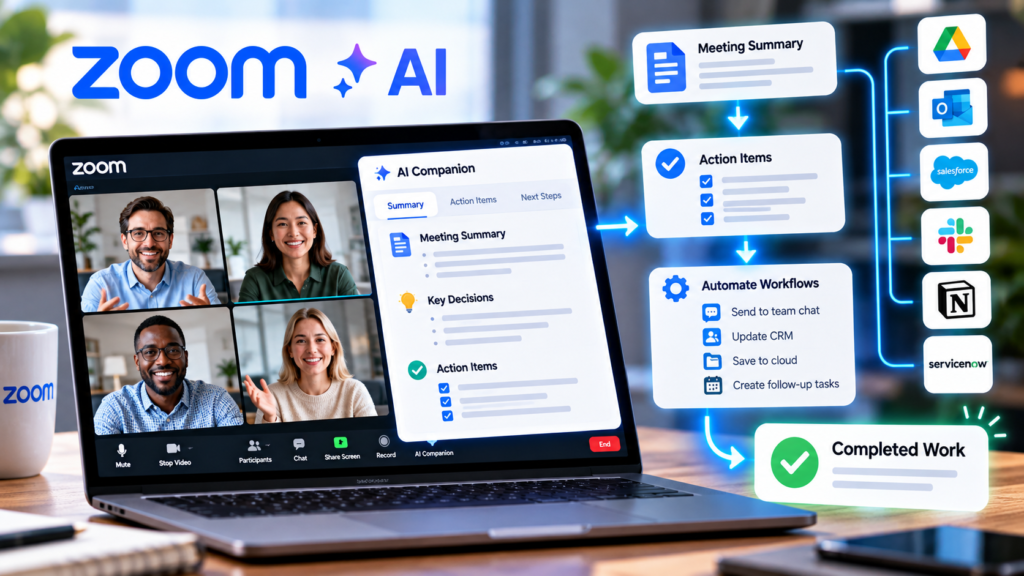
The centerpiece is a new Unified Context Layer, which connects conversations with relevant documents, business data, and third-party applications. Zoom is also expanding its My Notes features, introducing new workflow capabilities, and developing AI agents that can coordinate parts of a project.
The idea is simple: spend less time reconstructing what happened in meetings and more time acting on the decisions made there.
Why Zoom Wants to Move Beyond AI Meeting Summaries
AI meeting summaries have already made it easier to review discussions without watching an entire recording or manually writing minutes.
But a summary is not the same as completed work.
Imagine a team discussing a product launch. During the meeting, the team agrees to update a landing page, prepare a marketing campaign, assign a deadline to the design team, and contact several customers.
A conventional AI summary might list those decisions. Someone still needs to transfer the information into project management software, send messages, update customer records, and follow up on outstanding tasks.
That gap between understanding a conversation and acting on it is the problem Zoom is trying to address.
In its official Zoomtopia AI announcement, Zoom describes a system designed to connect meeting intelligence with the tools where work continues after a conversation ends.
The goal is not merely to produce better notes. It is to make those notes useful in the next stage of a workflow.
What Is Zoom’s Unified Context Layer?
The Unified Context Layer is the foundation of Zoom’s new approach to workplace AI.
It is designed to connect information from meetings, phone calls, chats, documents, and supported third-party applications. This gives people and AI agents a broader picture of what has been discussed, what decisions have been made, and what needs to happen next.
Without this connection, employees often have to search through several applications to reconstruct the history of a project.
For example, a sales representative might need to review a customer meeting, find a related email, check a document in Google Drive, and look up the latest information in a customer relationship management system.
Zoom wants AI to help bring that context together.
The company says its agentic search can retrieve information from Zoom Meetings, Phone, and Chat, as well as more than 40 third-party applications, including ServiceNow, Workday, Google Drive, and Microsoft OneDrive. Zoom describes this search capability as available now, although access depends on the applicable product and integration setup.
The approach also extends beyond Zoom’s own application. Through APIs and Model Context Protocol (MCP) connectors, Zoom’s conversation context can be accessed by supported external AI platforms.
That could make it easier for employees to use relevant meeting information without constantly switching between applications.
My Notes Workflows: Turning Meeting Notes Into Follow-Up Tasks
One of the most practical announcements is My Notes Workflows.
The feature is designed to turn meeting summaries into follow-up work in tools such as Zoom Chat and Salesforce. Zoom says users will be able to use ready-made workflows for sales, marketing, and IT, or describe a custom automation in natural language.
Instead of configuring every step manually, a user could describe the process they want to automate and use that description to create a workflow.
Consider a sales meeting. A workflow could take the meeting summary and send relevant follow-up information to a designated sales channel or supported CRM process.
A marketing team could use a similar approach to share campaign decisions and follow-up tasks with the appropriate colleagues.
The important distinction is that these workflows are designed to move information into the next stage of work rather than leaving it in a meeting transcript.
However, My Notes Workflows was announced as expected in October 2026, so users should check Zoom’s current product documentation and account availability before assuming it is enabled for them.
For employees who already use AI to turn spoken ideas into written documents, our guide to Google Docs’ voice-based document creation features offers a related productivity approach: reduce the manual effort required to capture ideas and turn them into usable content.
ZoomMate AI Agent Teams Can Work on Different Parts of a Project
Zoom is also expanding ZoomMate, its AI assistant for workplace tasks.
One announced capability is AI Agent Teams. The concept is to let multiple specialized AI agents work on different parts of a project in parallel, with a lead agent coordinating the work and consolidating the results into a single deliverable for human review.
For example, a project might require research, a first draft, supporting analysis, and a final summary. Rather than handling each stage sequentially, a coordinated group of agents could work on separate tasks and bring their outputs together.
This approach could be useful for projects involving several distinct activities, particularly when information is spread across multiple tools.
Zoom says its AI Agent Teams capability is available now. Actual functionality and access will depend on the product, account, and workflow involved.
Human review remains important. AI-generated research can contain errors, and a completed-looking deliverable does not automatically mean its facts, calculations, or recommendations are correct.
The practical value will depend on how reliably the agents perform their assigned tasks and how much review is needed before their output can be used.
Other Zoom AI Features to Watch
The Unified Context Layer is part of a broader set of workplace updates announced at Zoomtopia 2026.
Follow the meeting
Zoom plans to let My Notes provide personalized transcripts and summaries to invited users who miss all or part of a meeting.
The feature is intended to help employees catch up without asking colleagues to repeat the entire discussion. Zoom listed availability as expected in December 2026.
Enriched meeting notes
Another planned improvement connects shared screens, slides, charts, and in-meeting chat to relevant moments in a searchable transcript.
This could make meeting notes more useful when a decision depends on a particular slide, chart, or demonstration rather than spoken words alone. Zoom listed the feature as expected in November 2026.
A refreshed Zoom Chat experience
Zoom also announced a redesigned chat experience intended to make relevant conversations easier to find and bring AI agents directly into discussions.
The company listed this update as expected in December 2026.
These rollout dates reflect Zoom’s announcement on October 20, 2026. They are planned availability windows, not a guarantee that every customer will receive each feature on that date.
For the complete product details and rollout information, consult Zoom’s official Zoomtopia announcements.
What About Privacy and Control?
Giving AI access to meeting transcripts, chat messages, documents, and customer records creates obvious questions about data access and confidentiality.
A system that can connect information across applications must also determine which information a user or agent is allowed to access and what it can do with that information.
Zoom says its Unified Context Layer includes configurable settings and controls for managing access. The company has also announced additional AI governance features, including centralized management and custom guardrails.
Some of those controls are still planned for later rollout. Zoom listed centralized AI management as expected in December 2026 and custom AI guardrails as expected in the first quarter of 2027.
Organizations considering these tools should check the availability of relevant controls, review their data-handling policies, and establish rules for sensitive meeting content before enabling automated workflows.
It is also worth remembering that a meeting summary can contain confidential information even when the original recording is restricted. Teams should understand where summaries are sent, who can access them, and whether an automated workflow can share information with external systems.
Zoom’s AI security and management announcement provides more information about its planned governance capabilities.
Will Zoom’s AI Actually Make People More Productive?
The potential benefit is straightforward: fewer repetitive administrative tasks and less time spent moving information between applications.
But the real test is whether these features reduce the time required to complete work, not simply whether they produce more summaries or automate more steps.
A useful implementation should help a team answer practical questions:
- Are meeting decisions converted into clear, accurate tasks?
- Do the right people receive the right follow-up information?
- Are CRM records and project updates completed with less manual work?
- Can employees verify AI-generated outputs without spending excessive time correcting them?
- Are privacy and access controls appropriate for the information being processed?
If the answers are positive, AI workflows could remove a significant amount of routine coordination work.
If the automation produces inaccurate tasks, duplicates information, or requires extensive checking, some of the expected productivity gains may disappear.
Organizations should therefore evaluate these features using measurable outcomes, such as time saved per meeting, follow-up completion rates, error rates, and the amount of manual correction required.
Final Thoughts
Zoom’s latest AI announcements reflect a broader shift in workplace software: moving beyond tools that summarize information toward systems designed to help people act on it.
The Unified Context Layer is intended to connect conversations with business context. My Notes Workflows aims to move meeting summaries into follow-up processes, while ZoomMate’s AI Agent Teams are designed to coordinate parts of a project.
Some capabilities are already available, while others are scheduled for later rollout. Their usefulness will depend on product access, integration support, output quality, and how well organizations manage sensitive information.
For teams that spend too much time writing minutes, tracking decisions, and updating multiple applications, the direction is worth watching.
The most important question is no longer whether AI can summarize a meeting. It is whether AI can help ensure that the work agreed upon in that meeting actually gets done.